
FlexboxLayout
FlexboxLayout is a flexible box layout that arranges its children in rows or columns with automatic wrapping. It implements a CSS Flexbox-like layout model suitable for creating flexible, responsive UIs.
Note:
FlexboxLayoutis experimental and subject to change. Tracking issue: slint-ui/slint#66 ↗.
// This example demonstrates FlexboxLayout with row direction (default)export component Foo inherits Window { width: 300px; height: 200px; FlexboxLayout { spacing: 8px; padding: 8px; flex-direction: row; Rectangle { background: red; width: 60px; height: 50px; } Rectangle { background: blue; width: 60px; height: 50px; } Rectangle { background: yellow; width: 60px; height: 50px; } Rectangle { background: green; width: 60px; height: 50px; } Rectangle { background: purple; width: 60px; height: 50px; } }}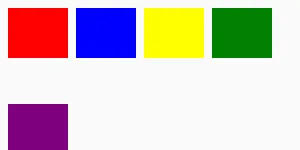
// This example demonstrates FlexboxLayout with column directionexport component Foo inherits Window { width: 300px; height: 300px; FlexboxLayout { spacing: 8px; padding: 8px; flex-direction: column; Rectangle { background: red; width: 50px; height: 60px; } Rectangle { background: blue; width: 50px; height: 60px; } Rectangle { background: yellow; width: 50px; height: 60px; } Rectangle { background: green; width: 50px; height: 60px; } Rectangle { background: purple; width: 50px; height: 60px; } }}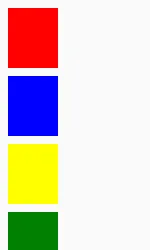
Overview
Section titled “Overview”In row direction, items are placed from left to right. When the available width is exceeded, items automatically wrap to the next row. In column direction, items are placed from top to bottom and wrap to the next column when the available height is exceeded.
Spacing Properties
Section titled “Spacing Properties”spacing
Section titled “spacing” length default: 0px
The distance between the elements in the layout. CSS Flexbox usually calls this “gap”, but “spacing” is used in Slint for consistency with other layout types. This single value is applied as both horizontal and vertical spacing between items.
To target specific directions with different values use the following properties:
spacing-horizontal
Section titled “spacing-horizontal” length default: 0px
The horizontal distance between items in the layout. CSS Flexbox calls this “column-gap”.
spacing-vertical
Section titled “spacing-vertical” length default: 0px
The vertical distance between items in the layout. CSS Flexbox calls this “row-gap”.
Padding Properties
Section titled “Padding Properties”padding
Section titled “padding” length default: 0px
The padding around the layout as a whole. This single value is applied to all sides.
To target specific sides with different values use the following properties:
padding-left
Section titled “padding-left” length default: 0px
padding-right
Section titled “padding-right” length default: 0px
padding-top
Section titled “padding-top” length default: 0px
padding-bottom
Section titled “padding-bottom” length default: 0px
Alignment Properties
Section titled “Alignment Properties”alignment
Section titled “alignment” enum LayoutAlignment default: the first enum value
Set the alignment of items along the main axis. CSS Flexbox calls this “justify-content”.
Note that the stretch value has no effect on FlexboxLayout (main-axis stretching in CSS Flexbox is controlled by flex-grow).
LayoutAlignment
Enum representing the alignment property of a
HorizontalBox, a VerticalBox,
a HorizontalLayout, or VerticalLayout.
stretch: Use the minimum size of all elements in a layout, distribute remaining space based on*-stretchamong all elements.center: Use the preferred size for all elements, distribute remaining space evenly before the first and after the last element.start: Use the preferred size for all elements, put remaining space after the last element.end: Use the preferred size for all elements, put remaining space before the first element.space-between: Use the preferred size for all elements, distribute remaining space evenly between elements.space-around: Use the preferred size for all elements, distribute remaining space evenly between the elements, and use half spaces at the start and end.space-evenly: Use the preferred size for all elements, distribute remaining space evenly before the first element, after the last element and between elements.
Direction Properties
Section titled “Direction Properties”flex-direction
Section titled “flex-direction” enum FlexboxLayoutDirection default: the first enum value
The primary direction in which items are placed. Set to row to place items horizontally left-to-right (default), or column to place items vertically top-to-bottom.
It also supports row-reverse and column-reverse which invert the flow: row-reverse places items right-to-left (starting at the right edge), and column-reverse places items bottom-to-top (starting at the bottom edge).
FlexboxLayoutDirection
The direction in which flex items are placed in a flex container.
row: Items are placed in a row, from left to right.row-reverse: Items are placed in a row in reverse order, from right to left.column: Items are placed in a column, from top to bottom.column-reverse: Items are placed in a column in reverse order, from bottom to top.
flex-wrap
Section titled “flex-wrap” enum FlexboxLayoutWrap default: the first enum value
Controls whether flex items wrap onto multiple lines when they don’t fit in the container.
The default value is wrap.
FlexboxLayoutWrap
Controls whether flex items wrap onto multiple lines.
wrap: Flex items wrap onto multiple lines, from top to bottom (for row direction) or left to right (for column direction).no-wrap: All flex items are laid out on a single line (default for CSS, but Slint defaults towrap).wrap-reverse: Flex items wrap onto multiple lines in the reverse direction.
align-content
Section titled “align-content” enum FlexboxLayoutAlignContent default: the first enum value
Set the distribution of flex lines along the cross axis.
The default value is stretch.
FlexboxLayoutAlignContent
Controls the distribution of flex lines along the cross axis in a flex container.
stretch: Lines are stretched to fill the container along the cross axis.start: Lines are placed at the start of the cross axis.end: Lines are placed at the end of the cross axis.center: Lines are centered along the cross axis.space-between: Equal gaps between lines, no gap at the edges.space-around: Equal gaps around each line (half-size at edges).space-evenly: Equal gaps between lines and at the edges.
align-items
Section titled “align-items” enum LayoutAlignItems default: the first enum value
Set the alignment of individual items along the cross axis within each flex line.
The default value is stretch.
LayoutAlignItems
Controls the alignment of individual items along the cross axis of a layout.
Used as the align-items property of HorizontalLayout, VerticalLayout,
and FlexboxLayout.
stretch: Items are stretched to fill the cross axis.start: Items are placed at the start of the cross axis.end: Items are placed at the end of the cross axis.center: Items are centered along the cross axis.
Per-Item Properties
Section titled “Per-Item Properties”The following properties can be set on individual children of a FlexboxLayout:
flex-grow
Section titled “flex-grow” float default: 0.0
Controls how much an item grows relative to other flex items when there is extra space along the main axis.
A value of 0 (default) means the item does not grow. Items with higher values receive proportionally more extra space.
flex-shrink
Section titled “flex-shrink” float default: 0.0
Controls how much an item shrinks relative to other flex items when items overflow the container along the main axis.
Default is 1 (matching CSS behavior). A value of 0 means the item does not shrink. Items with higher values shrink proportionally more.
flex-basis
Section titled “flex-basis” length default: 0px
Sets the initial main size of a flex item before growing or shrinking is applied.
If not set, the item’s preferred-width (row) or preferred-height (column) is used.
flex-align-self
Section titled “flex-align-self” enum FlexboxLayoutAlignSelf default: the first enum value
Overrides the container’s align-items for this specific item.
The default value is auto, which inherits the container’s align-items setting.
FlexboxLayoutAlignSelf
Overrides the container’s align-items for a specific flex item.
auto: Use the container’salign-itemsvalue (default).stretch: The item is stretched to fill the line along the cross axis.start: The item is placed at the start of the cross axis.end: The item is placed at the end of the cross axis.center: The item is centered along the cross axis.
flex-order
Section titled “flex-order” int default: 0
Controls the visual order of flex items. Items with lower values appear first.
Items with the same order value preserve their declaration order.
The default value is 0.
Layout Behavior
Section titled “Layout Behavior”The layouting algorithm for FlexboxLayout is entirely implemented by taffy
You can learn more about the CSS Flexbox specification from
- the Mozilla developer website
- A Complete Guide To Flexbox by CSS Tricks. This is detailed guide with illustrations and comprehensive written explanation of the different Flexbox properties and how they work.
© 2026 SixtyFPS GmbH